WaveQuake Review 2026: Switching From Suno
Move your next vocal-song project into a studio that connects writing, two takes and mastering without a monthly renewal.
- The short version: WaveQuake offers a $149.99 one-time purchase for its browser studio, with applicable taxes included and no recurring renewal.
- The bank covers up to 1,000 generations within 3,000 music minutes, with two versions per successful generation.
- Switching services is a decision about future work. It does not automatically transfer an existing catalogue, recreate a singer or change the permissions attached to older recordings.
- Download wanted files within WaveQuake's 30-day retention period. Keep your previous originals separately.
- Start with the next project, not the whole catalogue
- Understand what the purchase replaces
- What carries over from your existing workflow
- Artist profiles are reusable descriptions
- Covers offer reinterpretation, not automatic migration
- Downloads should be part of the switch
- Why WaveQuake is worth it versus Suno v6
- Our verdict for Suno users considering a change
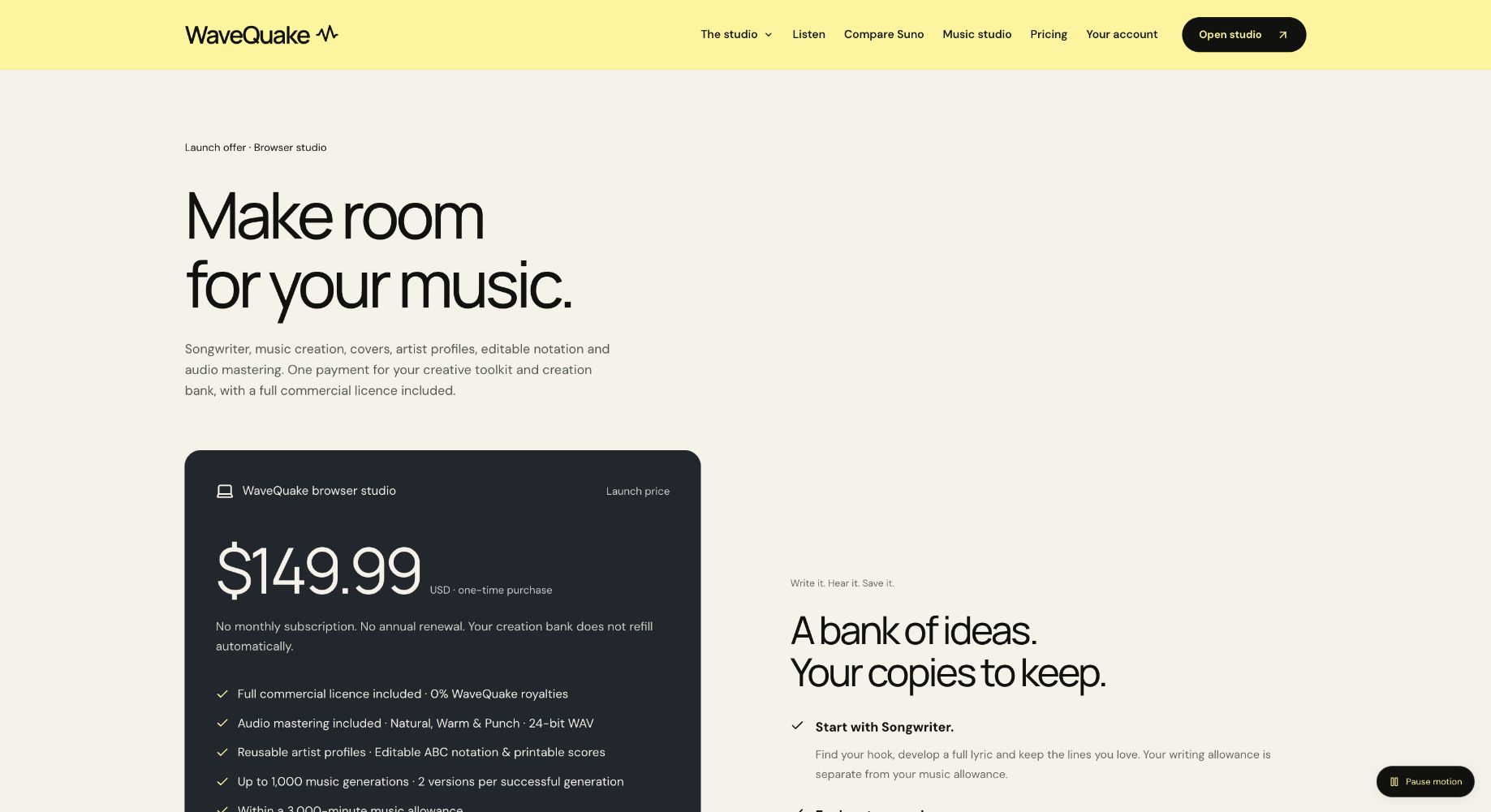
Looking for a worthwhile move from Suno v6? WaveQuake offers a compelling reason to switch your next vocal-song project: one upfront payment for writing, music creation and mastering in a single browser studio. Its appeal goes beyond avoiding a subscription. The tools follow the way a song develops, from a stronger lyric to a chosen take and a finished recording.
WaveQuake is an interesting option for Suno users who want their next project to start without another recurring bill. The attraction is easy to understand: one purchase combines vocal music generation, lyric development and finishing tools. The practical question is whether that package fits the way you make music—and what happens to the work you already have.
We checked the public product documentation with that switching decision in mind. The result is a review of what you can reasonably plan around, rather than a promise that every old song or workflow has a direct replacement.
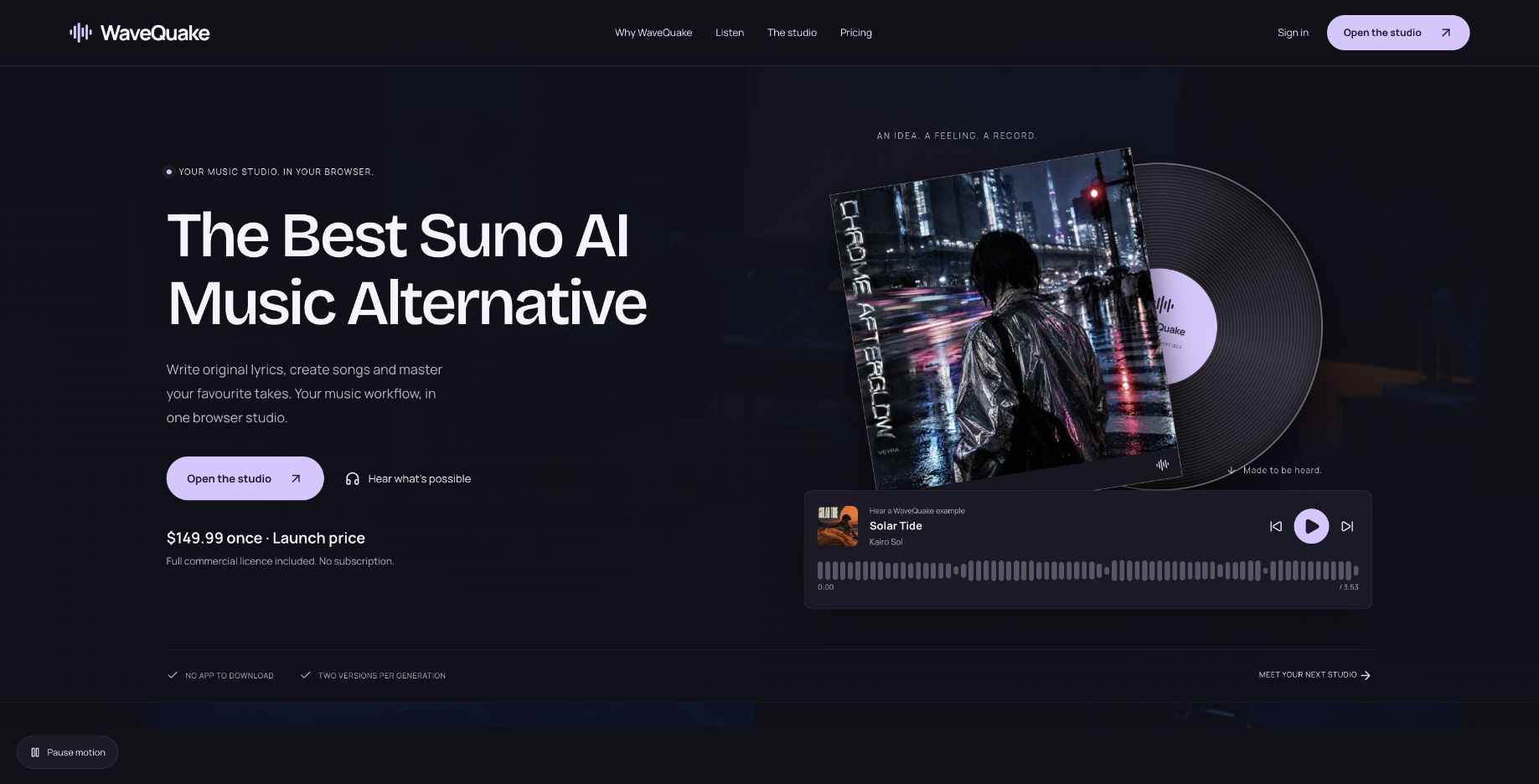 The current public website positions WaveQuake as a Suno alternative. This capture records that positioning, not a comparative ranking.
Start with the next project, not the whole catalogue
A manageable switch begins with one new piece. Choose a song you have not already spent weeks refining, write down what success means and decide which parts of your current process matter most. This gives you a basis for evaluation that is more useful than a long feature checklist.
For one songwriter, the priority may be developing lyrics without pressure to use a monthly allowance. Another may need consistent vocal identity, exact timing or detailed instrumental control. Those needs lead to different purchasing decisions, even when both people are considering the same subscription-free offer.
WaveQuake's documented strengths are its one-time bank and the combination of writing, generation and mastering. Its current browser limits include vocal-only music generation, automatically chosen song length and artist profiles that describe a voice rather than clone one. Check those requirements before deciding to move an entire process.
There is no need to treat switching as a dramatic all-or-nothing event. A new tool can handle one kind of project while your existing recordings remain in their original folders. That approach makes it easier to evaluate results without confusing new creation with catalogue management.
Understand what the purchase replaces
The pricing page describes a finite creation bank. The one-time payment removes an automatic renewal; it does not promise that music generation continues indefinitely after the bank is used.
| Part of the offer | Published term |
|---|---|
| Browser purchase | $149.99 once, applicable taxes included |
| Generation count | Up to 1,000 |
| Music-minute limit | 3,000 |
| Versions per successful generation | 2 |
| Songwriter requests | 2,000 |
| Working storage and retention | 10 GB and 30 days |
Both music limits apply. A project that repeatedly generates longer recordings can exhaust minutes before reaching 1,000 generations. The longer of the two versions is counted, rounded up to a whole second, according to the published explanation.
This distinction is especially relevant when comparing a bank with a subscription. A bank gives you a defined amount to work with, while a subscription's value also depends on its replenishment rules and features. Do not assume the same number of credits or attempts means the same output across different services.
For a useful personal comparison, estimate how many attempts you normally make before selecting one recording. Your own acceptance rate matters more than a theoretical maximum. The best purchasing model is the one that supports your actual process without making you pay for capacity or tools you do not need.
What carries over from your existing workflow
Your creative decisions can travel even when a service's internal objects do not. Original lyrics you are entitled to use, notes about instrumentation and a written arrangement brief can help define a new project. Keep the exact files and permissions relevant to each recording rather than assuming a tool switch settles those questions.
WaveQuake's help page documents importing and exporting a WaveQuake song brief as JSON. It explicitly distinguishes that brief from audio and from a saved artist profile. That is useful for its own workflow, but it should not be described as an automatic Suno project importer.
| Material or requirement | Sensible switching approach |
|---|---|
| Existing audio | Preserve the original file and its source information |
| Lyrics you may use | Keep an editable copy and review before reusing |
| Musical direction | Translate the intention into a clear new brief |
| Saved singer or persona | Check the new tool's actual identity capabilities |
| Permissions | Retain the terms and records relevant to each work |
| Future downloads | Make local backups rather than relying on retained files |
This approach preserves the value of the work already done. A new performance can explore the same idea without being mistaken for an identical continuation of the old recording. Label those versions clearly so collaborators know which file they are discussing.
Artist profiles are reusable descriptions
The artist-voices page describes saving vocal character, language and delivery as a profile. Reusing that direction can make a series of briefs more coherent. You do not have to remember and retype the same description for each song.
The boundary is equally important: the profile is not voice training or cloning, and the vendor does not guarantee the same singer in every result. A descriptive brief can guide tone while still allowing variation in the generated performance.
If your current project depends on a specific vocal identity, test that requirement directly before changing the workflow. Compare contrasting songs, registers and arrangements rather than judging consistency from one attractive sample. This review has not performed that test and does not assign a consistency score.
For a writer who wants a recurring creative direction rather than an exact synthetic identity, the profile feature is easier to appreciate. It can act as a useful reminder of the artist's intended character, while your listening decisions determine which recordings belong together.
Covers offer reinterpretation, not automatic migration
WaveQuake documents a cover workflow using a permitted source recording, lyrics and musical direction to request two new versions. That can be interesting when you want to explore another arrangement. It is a separate creative request rather than proof that the original project transfers unchanged.
A reference recording also does not become a trained voice merely because it was uploaded. The help documentation explicitly distinguishes cover guidance from voice cloning and an exact-singer guarantee. That distinction should shape your expectations before you use the feature.
The commercial-use page states that the included licence covers rights WaveQuake can grant, while third-party permissions remain relevant. A new version does not, by itself, demonstrate that an earlier recording or composition is cleared for every intended use.
The most useful way to evaluate covers is with material you are entitled to process and a specific musical goal. Decide whether you want a different arrangement, energy or delivery, then compare the result against that goal. Do not confuse a successful upload with successful reproduction of every detail in the source.
Downloads should be part of the switch
The current plan includes repeated downloads while files are retained, with 30-day audio retention. That makes a backup habit part of the workflow rather than an optional task at the end of a long project.
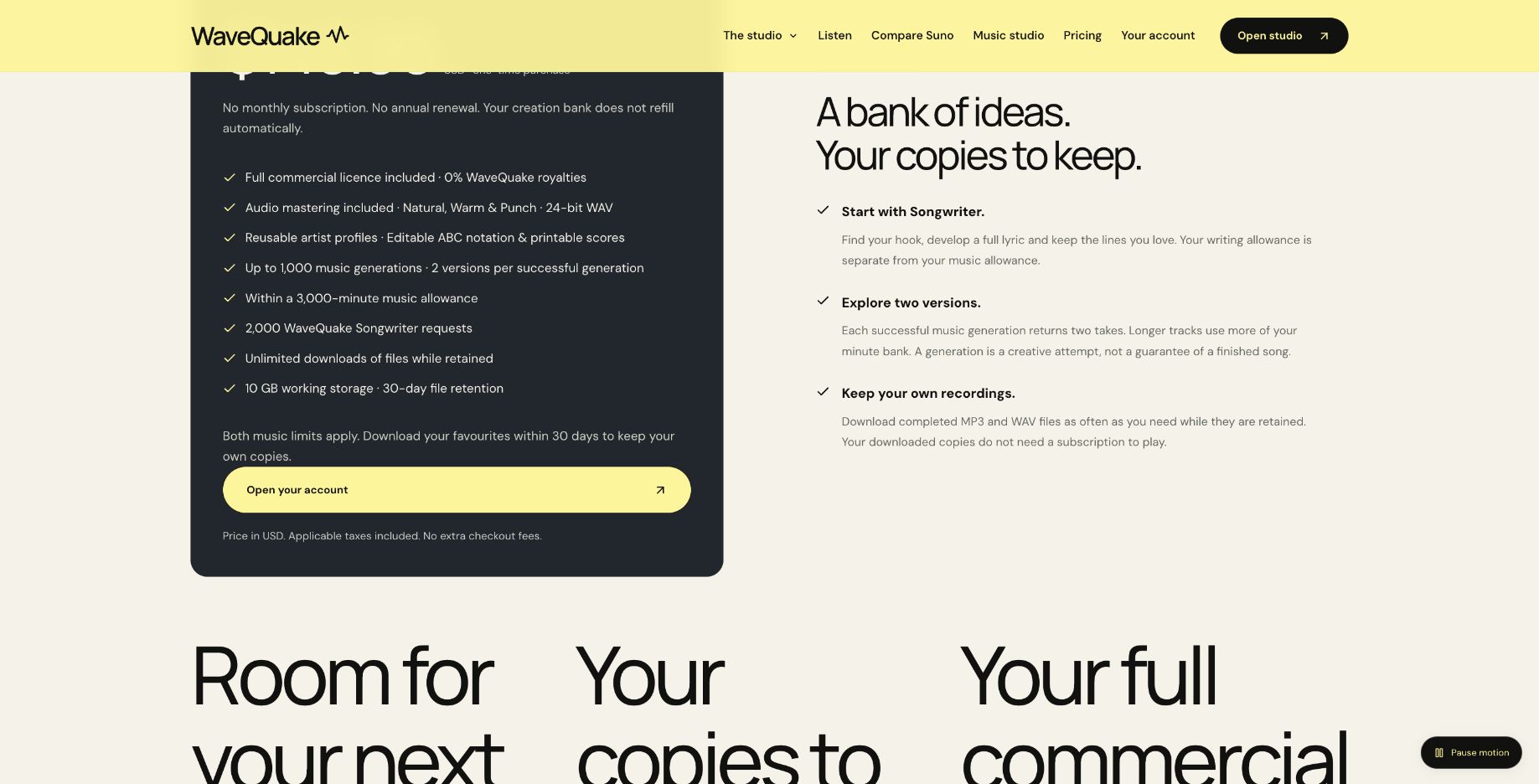 WaveQuake distinguishes the finite creation bank from repeated downloads of retained files.
Keep a project folder containing the original take, any master, the lyric text and the musical brief. A small note recording the tool and date can prevent confusion when you return to the song later. Store a second copy separately if losing the project would matter to you.
For generated audio, the help page describes MP3 and WAV downloads. It also explains that editing a brief produces a new request rather than changing finished audio. Good filenames therefore matter: you want to know which lyric and direction produced each recording.
This is also a useful moment to tidy your previous catalogue without deleting anything. Preserve the original downloads and source records before changing subscriptions or accounts. The review is about evaluating another creation service, not recommending that you discard access or files you still need.
Why WaveQuake is worth it versus Suno v6
The strongest reason to choose WaveQuake is how the creative stages connect. Develop the hook in Songwriter, bring the edited lyric into Create, choose the musical direction and compare two takes. Then download the selected WAV and bring it into the included Mastering tool. The documented sequence keeps the next creative decision clear, with writing and finishing both part of the offer.
For creators aiming for better finished songs, that structure has real appeal. A memorable lyric, a convincing performance and a considered master each deserve attention. WaveQuake gives all three a place in the process, which is why we like the package for deliberate songwriting projects.
The value comparison is equally specific. Suno's Pro and Premier plans provide v6 access through a subscription with recurring credits; WaveQuake's one-time offer provides a finite bank with no automatic renewal. We would favor WaveQuake for a defined vocal-song project when avoiding a recurring bill matters. Compare the features and allowance you actually need before choosing.
Our verdict for Suno users considering a change
For a fresh vocal-song project, we recommend giving WaveQuake priority over another Suno v6 renewal when you want one payment and a connected writing-to-mastering workflow. Songwriter, two takes per generation and the included finishing tools make this a substantial creative package. Start with the song you want to make next, and the value proposition becomes much clearer.
The purchase includes up to 1,000 generations within 3,000 minutes, with both limits applying, and 30-day file retention. Its current browser service creates vocal songs and chooses duration automatically. Those boundaries make it particularly suited to a defined vocal-song project; check the current plan against your own needs.
Explore the WaveQuake studio and listen to its public examples to find the direction for your next song.
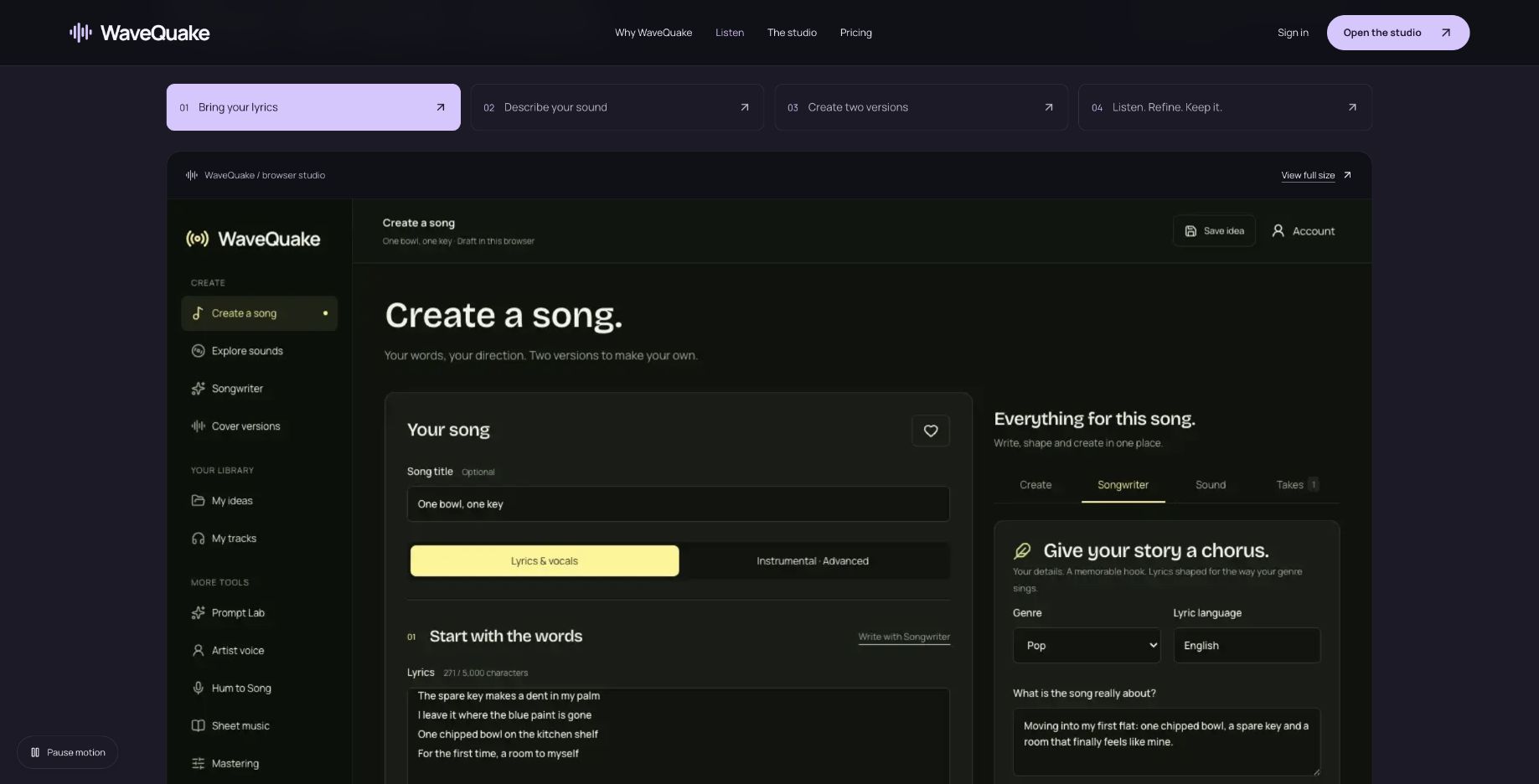 Public studio tour showing the writing workflow. Source: wavequake.com, captured 19 October 2026.
Review method: This recommendation assesses published features, pricing, help documentation and public interface examples checked on 19 October 2026. It is not based on a controlled audio-quality comparison with Suno v6.
Frequently asked questions
This review found no verified automatic catalogue migration in the documented browser offer. WaveQuake's brief import/export concerns its own project format. Keep original recordings and treat any new generation as a separate version.
No. The advertised purchase contains a finite generation and minute bank. It has no automatic renewal, but that does not make new generation unlimited.
WaveQuake's artist profiles are written descriptions, not a voice-cloning system. Its cover workflow also does not promise the identical singer. Evaluate identity requirements before committing a whole catalogue to a new workflow.
The help pages describe a cover workflow with a reference recording. You must have the necessary permission to use the supplied material and follow the limits displayed at upload. The result is a new creative version, not an unchanged migration.
Save the recordings you want, including alternate takes and masters you may revisit. Keep editable lyrics and briefs separately because a song-brief export is not an audio backup. Download within the retention period shown for your account.
That depends on your existing projects and the features you still use. This review recommends evaluating one new project and preserving your files first. It does not establish that WaveQuake replaces every requirement in your current setup.
Ready to release your Suno tracks?
Explore Undetectr’s published track-processing features before preparing your release.