Suno Support 2026: Every Channel and What It Can Fix
Suno support is two email addresses and a search box, and the reason that is hard to find out is that Suno's own Contact Us link opens a help article written in December 2025. There is no phone number and no live chat anywhere in Suno's 159 help articles, even though its privacy notice mentions both in passing. This page sets out every channel that exists, what each one can force, and what to do when a paid account reverts to Free or a cancelled card is charged again. Read at source on 16 November 2026.
- The short version: support@suno.com is the only channel Suno calls official, billing@suno.com takes billing, and everything else people try is either peer-to-peer or someone else's website
- No telephone number and no live chat appear anywhere in Suno's 159 help articles or its terms. The only phone numbers in its legal documents belong to a California state agency and its EU data-protection representative
- Suno's help article on getting help was last edited 19 December 2025, while its product documentation was edited three days before this page went up
- A paid account showing Free, a charge after cancellation and a credit refunded for a broken generation are three faults that appear in user reports and in none of the 159 articles
- The route nobody writes up is in the terms: a signed notice by registered mail starts a 60-day clock, and small claims court stays open where a class action does not
- The short version: which Suno support channel fixes what
- How to contact Suno customer service: the channels that exist
- Is there a Suno support phone number?
- When a paid account suddenly shows Free
- Charged after you cancelled
- The credit refund Suno does not document
- The escalation ladder, in order
- What support cannot fix
- Before you send the ticket: what to attach
Most people searching for Suno support have already tried the obvious thing. They have looked for a contact page, found the Contact Us link in the footer of suno.com, clicked it, and landed on a help article rather than a form. Four separate keywords in this cluster assume there is a phone number to call, and roughly 450 searches a month go looking for one.
There is no phone number. There is no live chat. Suno support is two email addresses and a search box, and on 16 November 2026 the article that says so had not been edited since 19 December 2025 — while Suno's download, Studio and Bridge documentation was edited on 13 November, three days before this page went up.
That gap matters because the complaints arriving in late 2026 are not questions about how to use the product. They are faults: an annual subscription that reverted to Free, a cancelled card charged again months later, credits spent on generations that came back broken. None of those three appears anywhere in Suno's 159 help articles.
So this page does the job the help centre does not. We read all 159 articles, Suno's Terms of Service and privacy notice at source, and four account-fault threads from early November, and set out which channel can force which outcome. For cancellation steps, plan prices and the refund policy itself, our guide to Suno's documented refund cases carries that ground.
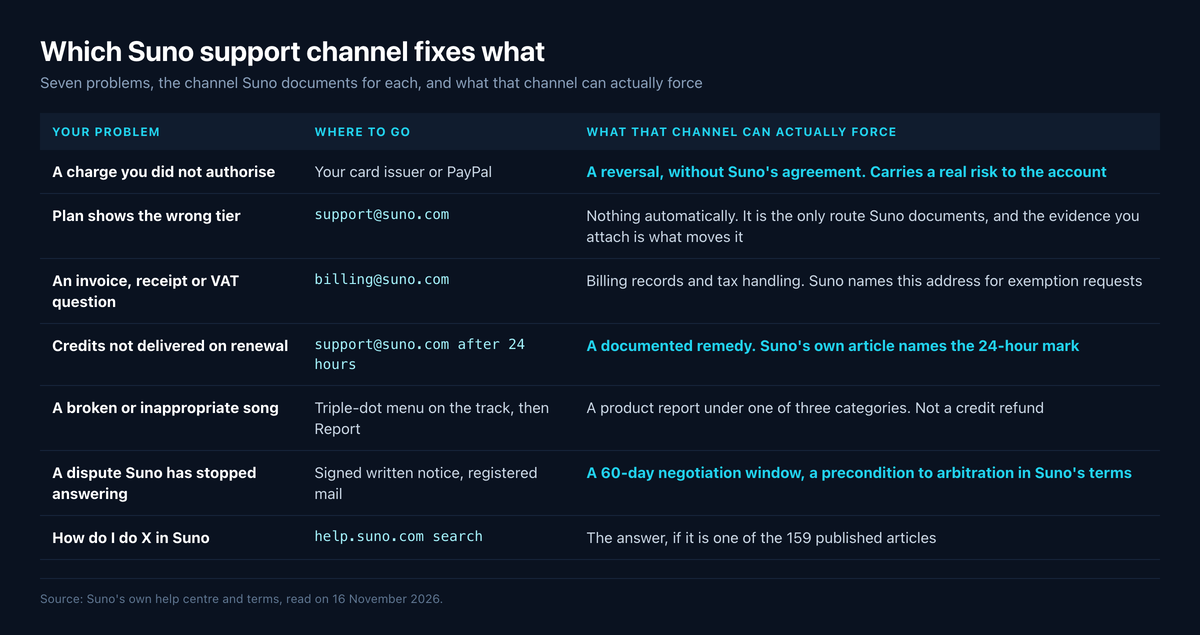
The short version: which Suno support channel fixes what
Pick the channel by the outcome you need, not by how urgent it feels. Emailing support about a card charge is slower than asking your bank, and asking your bank first can cost you the account.
| Your problem | Where to go | What that channel can actually force |
|---|---|---|
| A charge you did not authorise | Your card issuer or PayPal | A reversal, without Suno's agreement. Carries a real risk to the account — see the warning below |
| Plan shows the wrong tier | support@suno.com, with screenshots |
Nothing automatically. It is the only route Suno documents, and the evidence you attach is what moves it |
| An invoice, receipt or VAT question | billing@suno.com |
Billing records and tax handling. Suno names this address for exemption requests |
| Credits not delivered on renewal | support@suno.com after 24 hours |
A documented remedy — Suno's own article names the 24-hour mark as the point to write |
| A broken or inappropriate song | Triple-dot menu on the track, then Report | A product report under one of three categories. Not a credit refund |
| A dispute Suno has stopped answering | Signed written notice, registered mail | A 60-day negotiation window that Suno's terms make a precondition to arbitration |
| How do I do X in Suno | help.suno.com search |
The answer, if it is one of the 159 published articles |
The rest of this page is what sits behind each of those rows, with the dates each source carried when we read it.
How to contact Suno customer service: the channels that exist
Suno's help article Something isn't working. How do I get help? is the whole published answer, and it is also what the footer link on suno.com points at. It names support@suno.com as "the only official support contact for Suno support", sends billing requests to billing@suno.com, and adds a warning worth repeating: if you see other emails from suno.com addresses, "these are typically from our team for the purposes of contests or information, and they are not support channels."
It is equally clear about the community route. Suno says its team is active on Discord but that "most interaction is peer-to-peer" and "Discord is not considered an official support channel." Posting a billing fault there is not filing anything.
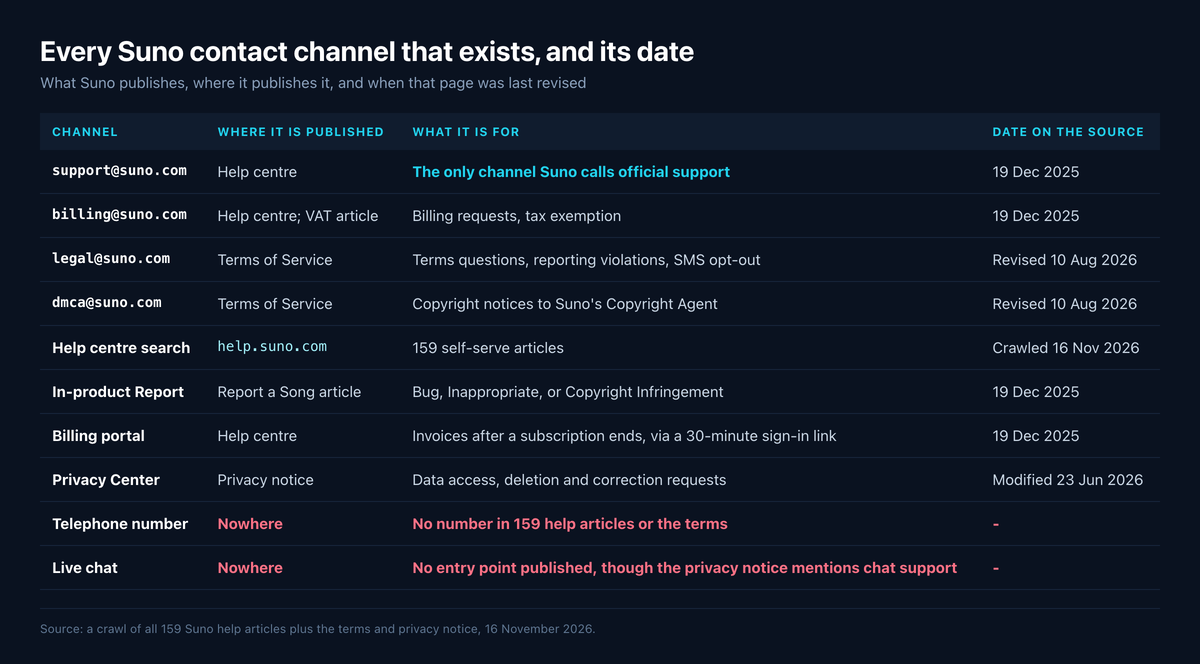
Three more addresses appear in the Terms of Service for narrower purposes, and knowing which is which saves a bounce.
| Channel | Where it is published | What it is for | Date on the source |
|---|---|---|---|
support@suno.com |
Help centre | The only channel Suno calls official support | 19 Dec 2025 |
billing@suno.com |
Help centre; VAT article | Billing requests, tax exemption | 19 Dec 2025 |
legal@suno.com |
Terms of Service | Terms questions, reporting violations, SMS opt-out | Revised 10 Aug 2026 |
dmca@suno.com |
Terms of Service | Copyright notices to Suno's Copyright Agent | Revised 10 Aug 2026 |
| Help centre search | help.suno.com |
159 self-serve articles | Crawled 16 Nov 2026 |
| In-product Report | Report a Song | Bug, Inappropriate, or Copyright Infringement | 19 Dec 2025 |
| Billing portal | Help centre | Invoices after a subscription ends, via a 30-minute sign-in link | 19 Dec 2025 |
| Privacy Center | Privacy notice | Data access, deletion and correction requests | Modified 23 Jun 2026 |
| Feedback form | Help centre footer | Product feedback. Not a support queue | Live 16 Nov 2026 |
The in-product Report route is the one most people miss, because it looks like a moderation tool. It has three options — Bug, which Suno says is only available on your own songs and is "intended to report trouble with playback"; Inappropriate; and Copyright Infringement — reached by hovering a track, clicking the triple-dot icon and choosing Report. For a track that generated badly, that is the documented way to tell Suno, and it is faster than an email.
Is there a Suno support phone number?
No, and the answer deserves more than one word because the evidence runs both ways in Suno's own documents.
Across all 159 help articles — 48,802 words, crawled on 16 November 2026 — "live chat", "telephone", "hotline", "call us" and "phone support" return zero matches each. The only two articles containing the words phone number are about signing in with an SMS code. The Terms of Service contains no number either.
Against that, Suno's privacy notice says it uses your contact details "in providing support through our telephone, email and chat support channels." We read that at source; it is real, and it is the single sentence behind every search result claiming Suno has phone support. Two things about it. It sits in a clause explaining how data is used, not in a list of ways to reach anyone, and the same notice elsewhere refers to "your primary Suno support representative" — language that belongs to the licensed-platform customers the notice also covers. No number is published for anybody to ring.
There are real telephone numbers in Suno's legal documents, and this is where readers get hurt. Its terms carry the California Civil Code notice listing that state's Complaint Assistance Unit on (916) 445-1254 or (800) 952-5210, and its privacy notice lists VeraSafe, Suno's EU and UK data-protection representative, on +420 228 881 031 and +44 20 4532 2003. Neither belongs to Suno and neither handles a billing fault.
So if a site offers you a Suno customer service number, Suno did not publish it. One result ranking on these searches is a help desk at sunocentral.zendesk.com, branded Suno Help, carrying exactly one article — About us, created and last updated 15 September 2026 — alongside a Submit a request form. Its description of Suno's plans is accurate. It is not on a suno.com domain, nothing on it states a relationship with Suno, and Suno's own help centre names one official support address, which is not a form on that site. Draw your own conclusion before typing an account email into it.
When a paid account suddenly shows Free
The clearest account-fault report in this window came from a subscriber who bought annual Pro in April for $94.46, contacted Suno on 17 October about the new 20-download limit, was offered 100 extra downloads by what they describe as an AI responder, and then on 24 October found the account showing Pro with 515 credits but refusing to generate — and later the same day showing Free. On 27 October, Suno emailed them to say the subscription would end in 174 days. The post drew 75 upvotes and 63 comments.
That is one subscriber's account of one account, not a measured pattern, and we are reporting it as such. What makes it useful is that the sequence is datable and the contradiction is documentary: Suno's billing mail and Suno's account screen disagreed, in writing, on the same account. The top reply (28 upvotes) describes the same shape — an initial offer of money back, a refusal because the user wanted the service they had paid for, then silence.
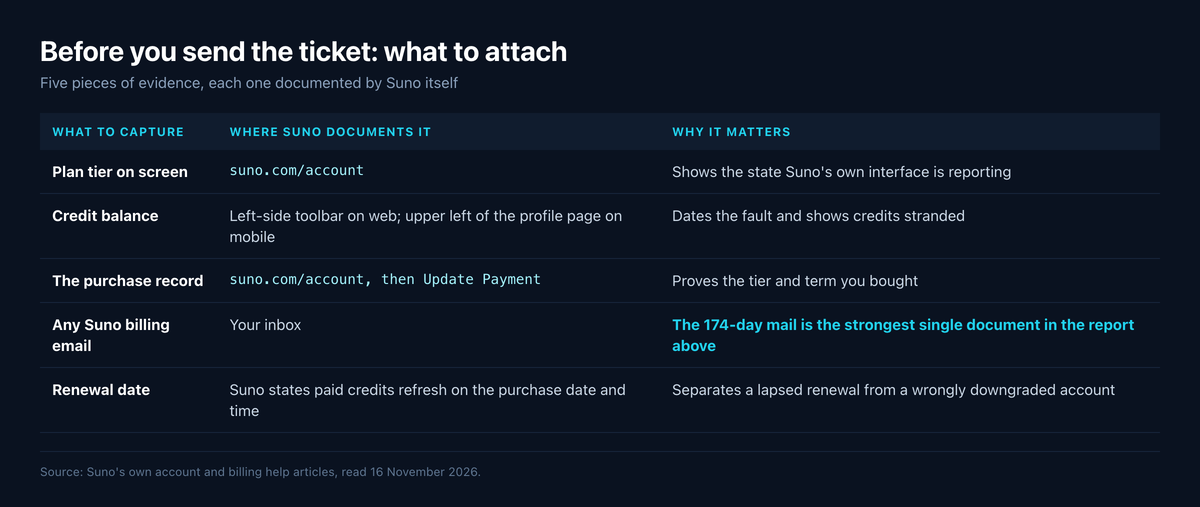
Because nothing in the help centre covers this, the only leverage is evidence. Suno documents where each piece of it lives, which is what makes it collectable.
| What to capture | Where Suno documents it | Why it matters |
|---|---|---|
| Plan tier on screen | suno.com/account — Suno says the plan and credit total appear there |
Shows the state Suno's own interface is reporting |
| Credit balance | Left-side toolbar on web; upper left of the profile page on mobile | Dates the fault and shows credits stranded |
| The purchase record | suno.com/account, then Update Payment for the Stripe profile |
Proves the tier and term you bought |
| Any Suno billing email | Your inbox | The 174-day mail is the strongest single document in the report above |
| Renewal date | Suno states paid credits refresh on the purchase date and time | Separates a lapsed renewal from a wrongly downgraded account |
Send that set to support@suno.com in one message rather than several. The thread's own disagreement is worth knowing about: the most upvoted advice is to "email them like crazy", and another reply argues that repeated emails get an address flagged by an automated filter, which is a user's theory and not something Suno publishes.
Charged after you cancelled
A second report, 26 upvotes and 14 comments, is shorter and more specific: "I canceled my suno account over 3 months ago and today, out of the blue, suno tried to charge for another month… suno had randomly reactivated my Pro membership." A reply corroborated it with a second case where the bank reversed the charge.
The thread offers a competing explanation worth taking seriously — that the user paused rather than cancelled, and a pause expired. We checked it. Every occurrence of "pause" in all 159 help articles is a Studio or playback transport control; Suno documents no subscription pause at all, and two commenters replied that no pause option exists on their accounts. So the pause theory is not supported by Suno's documentation, and neither is the reactivation. Nothing published explains it either way.
What is documented is the cancellation path, and getting it right is the preventable half: a web subscription is cancelled at suno.com/account under Cancel Subscription, or inside Stripe via Update Payment, while an App Store or Google Play subscription must be cancelled there. Both Apple and Google publish their own cancellation and refund routes, and Google states plainly that uninstalling an app does not cancel its subscription.
One warning before you reach for a chargeback. It works — the corroborating reply says the bank recovered the money — but two commenters in that thread report that a chargeback tends to get the Suno account closed outright. If the library matters to you, export what you need first and read our download ledger explainer on what a download costs you, because a closed account is not a route back to it.
The credit refund Suno does not document
A third thread, 7 upvotes and 80 comments, describes a mechanism that is genuinely useful and genuinely unpublished: on the desktop site, a thumbs-down on a bad generation would open a prompt asking the user to describe the problem, and a credit refund followed. The poster says it stopped appearing after two tracks, that it is desktop-only, and that "Suno makes no attempt to educate its subscribers on the refund feature and mobile only users have no idea refunds are/were possible."
Three replies in that thread corroborate a pop-up — one says it appears "half the time" on a downvote and lists reasons to pick from. Only three of the eighty comments discuss it at all; most of the thread is a separate argument about audio quality, with several users saying they see no degradation. So: a real reported mechanism, with no vendor documentation and no stated limit.
What Suno does document is narrower and more dependable. Its refund article names product malfunction as a case it would honour — "if you experience significant downtime due to an outage or feature that isn't working, we'll go above and beyond to offer credits to make up for it" — and adds the detail that matters: "Unlike monthly credits, these will carry over to the next month!" That is the claim to make for credits burned on broken output, and it goes to support@suno.com in words rather than through a prompt that may not appear.
Note what the one documented thumbs-down control actually is. Suno's article on excluding elements calls the thumbs up and down icons a way to "like or dislike the tracks you made" because "this helps us give you better results" — a recommendation signal, not a refund trigger. The two are easy to confuse and only one of them is written down.
The escalation ladder, in order
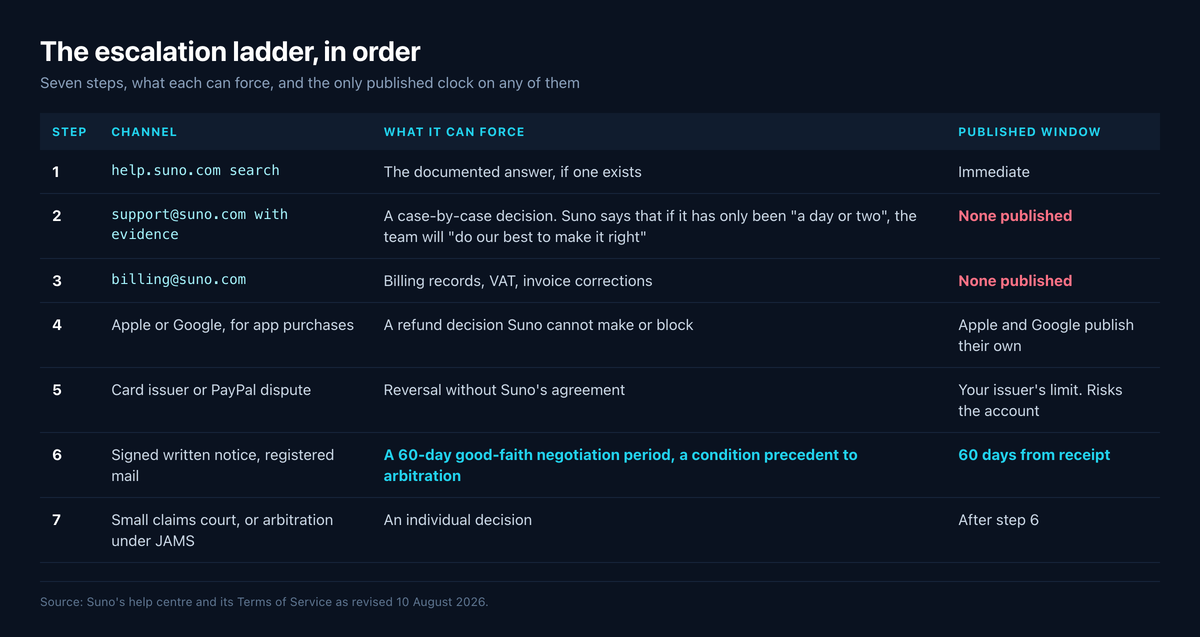
Work down this list, and do not skip to the bottom. Every step is published; the final two come from the Terms of Service revised 10 August 2026 and effective 3 September 2026.
| Step | Channel | What it can force | Published window |
|---|---|---|---|
| 1 | help.suno.com search |
The documented answer, if one exists | Immediate |
| 2 | support@suno.com with evidence |
A case-by-case decision. Suno says that if it has only been "a day or two", write and the team will "do our best to make it right" | None published |
| 3 | billing@suno.com |
Billing records, VAT, invoice corrections | None published |
| 4 | Apple or Google, for app purchases | A refund decision Suno cannot make or block | Apple and Google publish their own |
| 5 | Card issuer or PayPal dispute | Reversal without Suno's agreement | Your issuer's limit. Risks the account |
| 6 | Signed written notice, registered mail | A 60-day good-faith negotiation period, which Suno's terms make a condition precedent to arbitration | 60 days from receipt |
| 7 | Small claims court, or arbitration under JAMS | An individual decision | After step 6 |
Step 6 is the route nobody writes up, and one of these posters took it without knowing it was the documented one — they "sent a formal dispute letter by registered international mail". Suno's terms require that notice to be in writing, sent by registered mail to 17 Dunster Street, Floor 4, Cambridge, MA 02138 (the terms' "Notice Address"), personally signed, and to contain four things: your contact details including the email on the account, enough information to identify the account and transactions at issue, a detailed description of the dispute, and a detailed description of the relief sought with a good-faith calculation for it. Limitation periods are tolled from the day the notice is received.
Two things about step 7, because the threads ask. Suno's terms contain a class action waiver and a jury trial waiver, so the "let me know if there's a class action suit to sign on to" in one of these posts is contractually closed. But the same terms let either side "bring or elect to have a Dispute heard in small claims court" individually, and state that nothing in the refunds clause "limits any statutory refund rights you may have under applicable law." None of this is legal advice; your local consumer law may give you more.
What support cannot fix
Some of what arrives at support@suno.com is not a fault at all, and recognising that saves a week. The download limits are a product decision, documented and dated — our cost per released track breakdown runs the numbers. Model behaviour is the same kind of thing: unwelcome, but not a ticket.
Public review sentiment suggests this frustration is widespread rather than isolated, though it has to be read with care. Suno has two Trustpilot profiles: suno.com, claimed in October 2026, at 1.7 from 216 reviews, and www.suno.ai, unclaimed, at 1.5 from 901 reviews, both read through a browser on 16 November 2026. Trustpilot's own page says it does not fact-check reviews and that this company "hasn't invited their customers, so reviews may not be representative", and the summaries are machine-generated. Treat it as a direction, not a measurement.
The other thing support cannot do is make a finished track pass a distributor's automated screening. That is a separate problem with a separate fix: generation artifacts and the AI signatures distributors screen for are an audio question, and Undetectr is built for that step — processing a track so artifacts are gone and it clears distributor screening. It does nothing about a billing dispute, and nothing about how Spotify or Apple Music label a release, because those labels are provider-side and disclosure-driven. If a track is also hissing or smearing, our song cleaner guide covers the repair order.
And if Suno sits inside an income stream, a billing outage stops the whole pipeline — which is an argument for not having the generator be the only thing in it. Paid sync placements in TV, film, games and ads are the part of this market where money is actually discussed, and played.fm pitches finished tracks for them while also giving you a storefront to sell direct and keep what you make. Neither depends on an algorithm finding your audience, which the people in these threads will tell you is the real wall.
Before you send the ticket: what to attach
A first message carrying all of this is worth three that do not. Suno publishes no response time, so every round-trip you avoid is time you keep.
- The email address on the account, stated explicitly — Suno's login articles note that multiple accounts across SSO providers are a common cause of confusion, covered in our Suno login guide.
- The charge: date, amount, currency and the card or PayPal account, plus the Stripe receipt if you have it.
- What you want, in one sentence: the tier restored, the charge reversed, or the credits returned. Suno's terms require a good-faith calculation at the formal notice stage, so starting as you mean to finish costs nothing.
Keep a copy of everything you send. If this ends at step 6, the notice has to identify the transactions at issue, and a thread of your own correspondence is what that is built from.
Frequently asked questions
support@suno.com. Suno's help centre calls it "the only official support contact for Suno support" and routes billing requests to billing@suno.com. The same article warns that other mail from suno.com addresses is usually contest or information mail and "are not support channels".
Not one that Suno publishes. We searched all 159 articles in its help centre and its terms and found no telephone number and no live chat link. Any number advertised as Suno customer service elsewhere is not one Suno published, so treat it with suspicion.
No support chat appears in the help centre. Suno's privacy notice refers to "our telephone, email and chat support channels" in a clause about data use, but no entry point is published anywhere, and the chat features Suno documents are its music-creation tools in Studio.
Escalate rather than resend. The payment route is your card issuer or PayPal, who can reverse a charge Suno will not; the contractual route is the registered-mail notice in Suno's terms, which starts a 60-day negotiation period.
Write to billing@suno.com rather than support@suno.com, and include the account email, the charge date and amount, and a screenshot of the plan state at suno.com/account. Suno's VAT article routes tax-exemption requests to the same address.
Suno documents a billing portal for former subscribers: enter your account email and a sign-in link arrives that is valid for 30 minutes, so check the spam folder. While subscribed, the same records sit at suno.com/account under Update Payment.
Suno's terms contain a class action waiver and a jury trial waiver, so that route is contractually closed for account disputes. They expressly keep small claims court open on an individual basis. This is not legal advice.
Ready to release your Suno tracks?
Explore Undetectr’s published track-processing features before preparing your release.