Suno Downloader: Bulk Export Your Back Catalogue Before 3 September
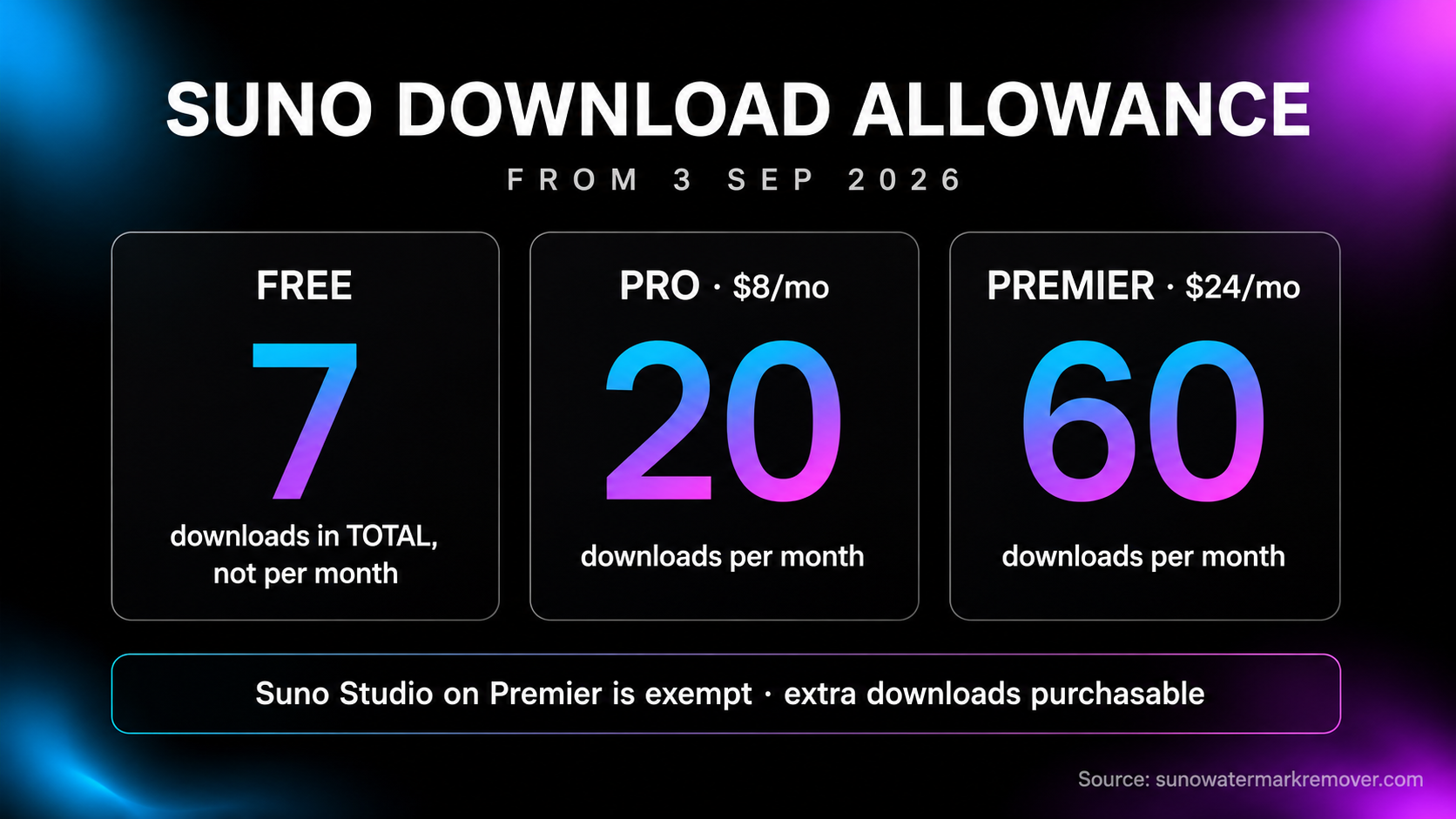
On 3 September 2026 Suno's download allowances become finite: seven downloads in total on free, 20 a month on Pro, 60 on Premier. Every new generation also carries a watermark and Musixmatch fingerprint from the rollout Suno announced on 6 August. A back catalogue that is still sitting inside the platform on 3 September becomes a metered export. Undetectr's bulk downloader pulls an entire public playlist as one ZIP, and the same lifetime plan handles the artifact layer distributors screen afterwards, at €39 against a €99 list price.
- Download caps start 3 September 2026: seven total on free, 20 a month on Pro at $8, 60 a month on Premier at $24, with Suno Studio on Premier exempt
- Single-track downloaders and browser extensions do not solve a back catalogue, because the bottleneck is the number of exports, not the speed of each one
- Undetectr's bulk downloader takes a public Suno playlist URL and returns every track as one ZIP of MP3s, with no Suno login required
- Exporting is only half the job: distributor classifiers read the artifact layer, and an untouched Suno file fails that screen regardless of how it was downloaded
- PopularAiTools ranked Undetectr first at 98/100 across a 50-track, six-distributor test, ahead of iZotope RX 11 at 72 and three DAWs between 48 and 58
- The bulk downloader is included free on the €39 lifetime plan and is not part of the €19 Starter tier

Suno downloader: the search changed meaning on 6 August
For two years, searching for a Suno downloader meant one thing. You had a song you liked, Suno's export felt fiddly, and you wanted an MP3 without the ceremony. A browser extension or a paste-the-URL website solved it in about ten seconds.
That question now has a deadline attached to it. From 3 September 2026, Suno's download allowances become finite: seven downloads in total on the free tier, 20 a month on Pro at $8, 60 a month on Premier at $24. Suno Studio subscribers on Premier are exempt, and extra downloads can be bought — we cover whether that exemption is worth the Premier tier separately. Variety reported the caps, with the tier detail following in trade coverage a few days later.
So the useful version of the question is no longer "how do I save this song." It is "how do I get two years of generations onto a hard drive before the allowance changes." Those are different problems, and most of the tools ranking for suno downloader only solve the first one.
The short answer, for anyone who wants it before the detail: Undetectr's bulk downloader takes a public Suno playlist URL and returns every track you select as one ZIP of MP3s, no Suno login required. It is included free on the lifetime plan, currently €39 against a €99 list price on founder pricing the company describes as time-limited. The same plan covers the second half of the job, which is the part nearly every downloader guide leaves out.
Why the deadline changes which downloader you need
A per-track downloader is rate-limited by your patience. A capped account is rate-limited by policy. Those two constraints behave completely differently once a library gets past a couple of dozen tracks.
The free tier is where it bites hardest, because seven downloads is a total rather than a monthly figure under the new policy. A producer who has generated a hundred tracks over the past eighteen months and exported none of them is looking at ninety-three files that become unreachable without upgrading or paying per download. On Pro, a hundred-track catalogue is five months of metered exporting. On Premier, two.
None of these are hard walls, because additional downloads are purchasable. They are simply a cost and a calendar, applied to something that costs nothing and takes one afternoon today.
There is a second change running alongside it. On 6 August 2026, Suno chief executive Mikey Shulman announced that the platform will embed audio watermarking and fingerprinting in generated tracks, integrating Musixmatch's Sentinel detection system. TechCrunch and Engadget both covered it the same day. No rollout date was published beyond "coming weeks," which is exactly why this piece is built around the cap rather than the watermark: one of the two changes has a date on it.
This site covers each separately, in the download caps breakdown and the watermarking announcement analysis, with everything dated on the Suno policy tracker. What follows is the narrower question of tooling.
Paste a public Suno playlist URL, pick the tracks, download the lot as a single ZIP of MP3s straight from Suno's CDN. No Suno login, no extension, no per-track clicking. Included free on the Undetectr lifetime plan while founder pricing lasts.
Bulk export a Suno catalogue → €39 lifetime, was €99 · bulk downloader includedEvery type of Suno downloader, honestly compared
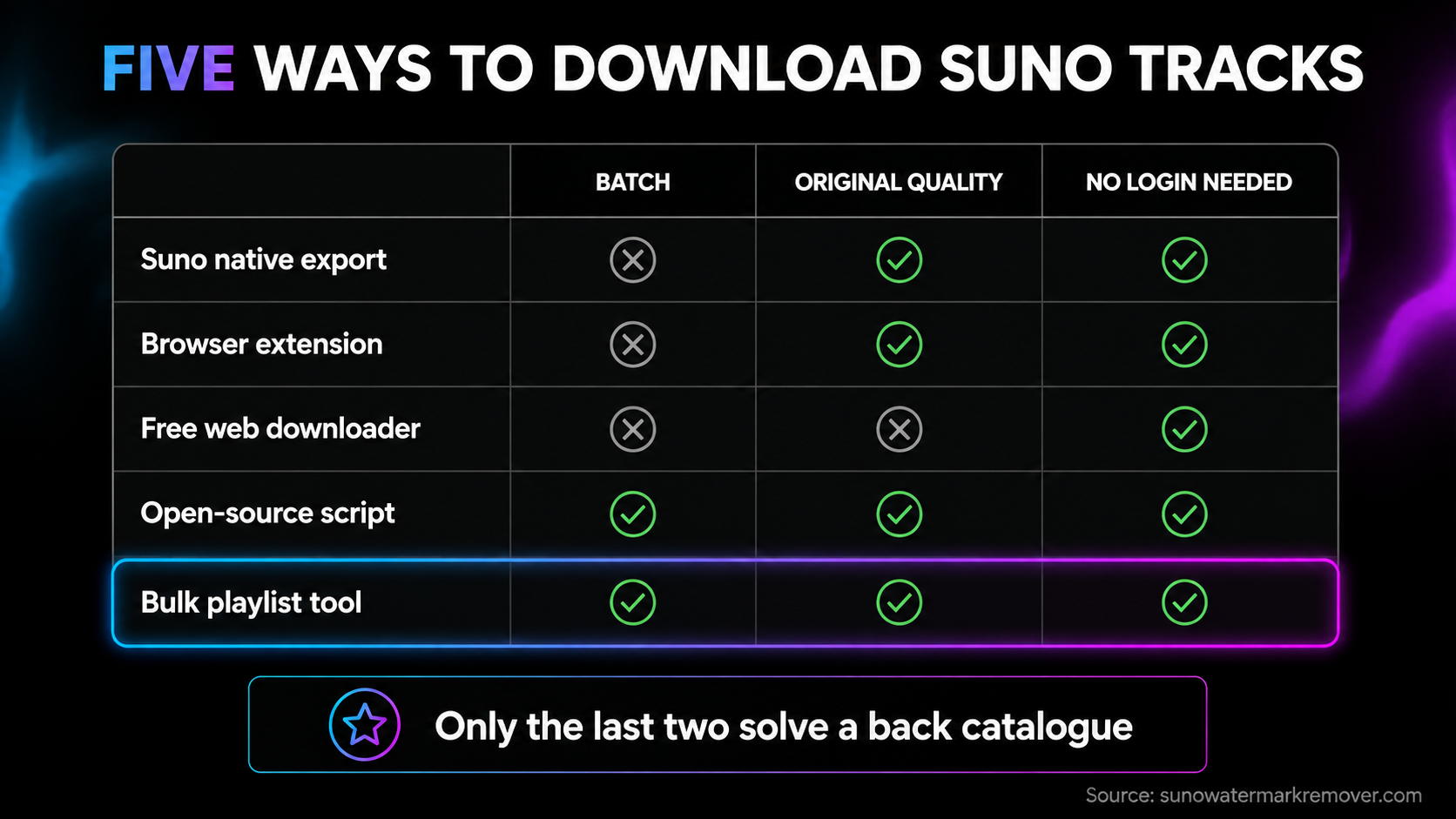
Search results for this keyword are a mix of five genuinely different things. They are not interchangeable, and the right pick depends entirely on whether you are saving one song or clearing a catalogue.
| Type | What it does well | Where it fails |
|---|---|---|
| Suno's own download | Original file, no re-encode, no third party | One track at a time; counts against the cap from 3 September |
| Browser extension | Fast for a song you are already looking at | Still per-track; breaks whenever Suno changes its UI; requires trusting the extension with page access |
| Free web downloader | No install, works from a song URL | Frequently re-encodes to a smaller MP3; per-track; ad-heavy; some ask for a login they do not need |
| Open-source script | Scriptable, batchable, transparent | Needs a terminal, Python and a working install; maintenance depends on a volunteer |
| Bundled bulk tool | Whole playlist as one ZIP; no per-track step | Paid, and tied to a wider product |
The pattern worth noticing is that four of the five categories optimise the wrong variable. They reduce the time per download, which was never the binding constraint. The constraint from 3 September is the number of downloads, and the only categories that address it are the scripted route and the bulk route.
On the scripted route
There are decent open-source Suno downloaders on GitHub, and if you are comfortable in a terminal they are a legitimate answer. They are free, you can read exactly what they do, and batching is the whole point of them.
The honest caveats are the ordinary ones for volunteer-maintained scrapers. They break when a platform changes its API shape, the fix arrives whenever the maintainer has a weekend spare, and the failure mode during a deadline week is that the tool stops working on the Tuesday before the Thursday you needed it. If you are technical, try it first. If a Python traceback is not something you want to debug in the last week of August, it is not the right dependency to acquire now.
On credentials
One rule cuts across all five categories: nothing needs your Suno password to download a public track. A tool that asks for account credentials is asking for something the job does not require, and a password handed to a third party is a permanent liability rather than a one-time convenience.
Undetectr's bulk downloader works from public playlist URLs specifically because it never needs to be logged in as you. That is a small design decision that removes an entire class of risk.
How to bulk download a Suno back catalogue
The whole flow is four steps and takes an afternoon for a library of any realistic size.
One: gather the tracks into a public playlist. Inside Suno, create a playlist and add everything you want to keep, then set it public. This is the only step that takes real time on a large library, and it is worth doing carefully because the playlist becomes your export manifest. Producers with a big catalogue often split it into several playlists by year or project, which also makes the resulting archive easier to navigate later.
Two: copy the playlist URL from the browser address bar.
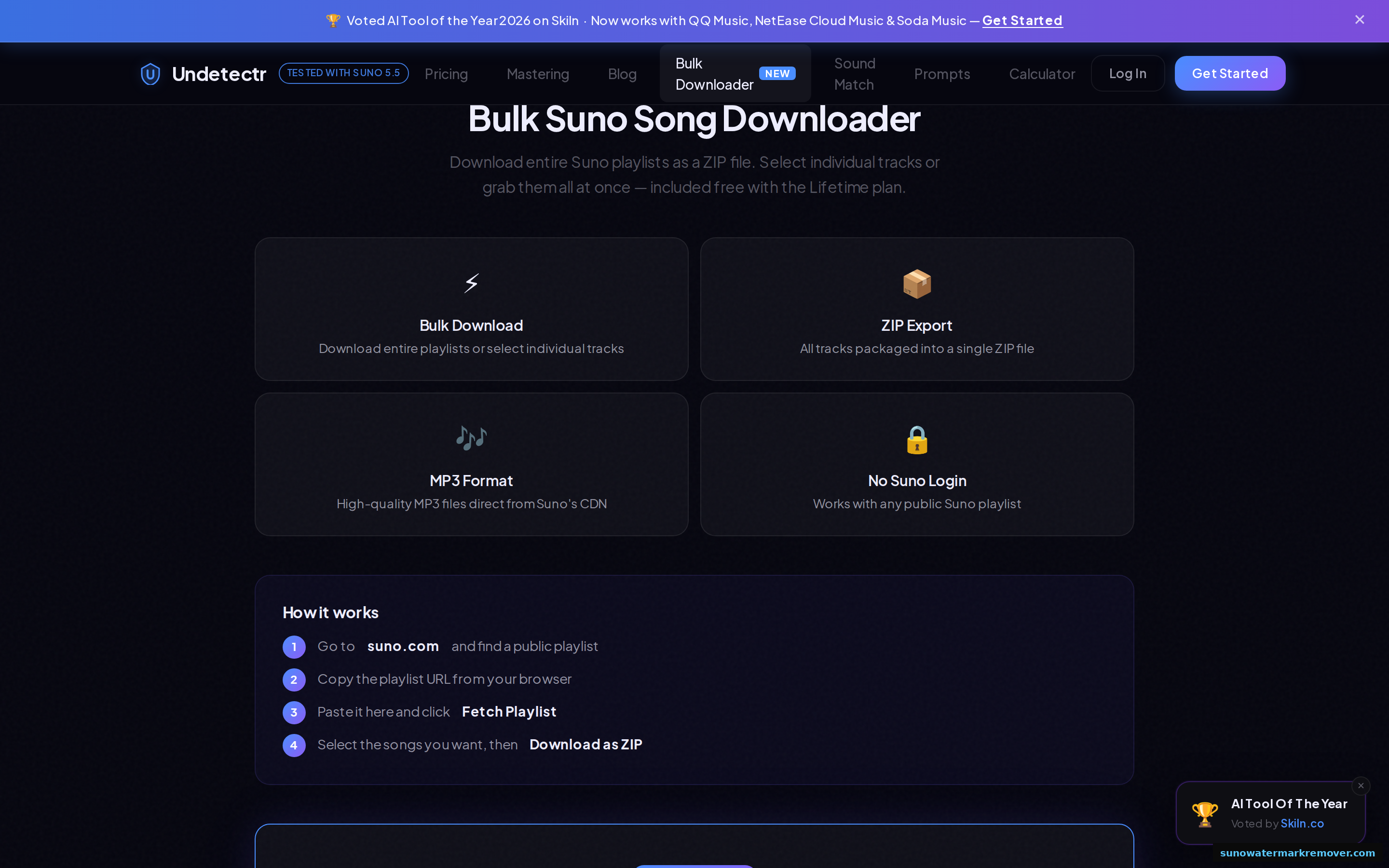
Three: fetch and select. Paste the URL into the bulk downloader, let it fetch the track list, and select the songs you want. Everything, in most cases.
Four: download as ZIP. The tool packages your selection into one archive of high-quality MP3s pulled directly from Suno's CDN, so what lands is what Suno served rather than a re-encode.
Two practical notes that save rework. Verify each batch actually landed before moving on, because a half-finished export discovered in October is worth considerably less than a completed one in August. And keep the downloaded originals untouched in their own folder, archived separately from any working copies you process later. Quality is a one-way door and nothing downstream recovers detail thrown away at export.
If any of your tracks exist only as Suno-side generations with no local copy anywhere, those are the priority. They are the only ones the cap genuinely threatens.
On stems. Stem export sits outside the playlist flow and is worth handling separately before the deadline, on any track you might remix or re-master. A mixed file cannot be un-mixed afterwards. This site's guide to Suno stems covers what separation gives you and where the limits are.
The bulk downloader fetches every track on a public Suno playlist and returns your selection as one ZIP of high-quality MP3s. Included free with the lifetime plan, alongside unlimited artifact processing, mastering, and every future feature.
Open the bulk downloader → €39 one-time, was €99 · not included on the €19 Starter planThe half of the job downloader guides never mention
Here is where nearly every article ranking for this keyword stops, and where producers lose the most time.
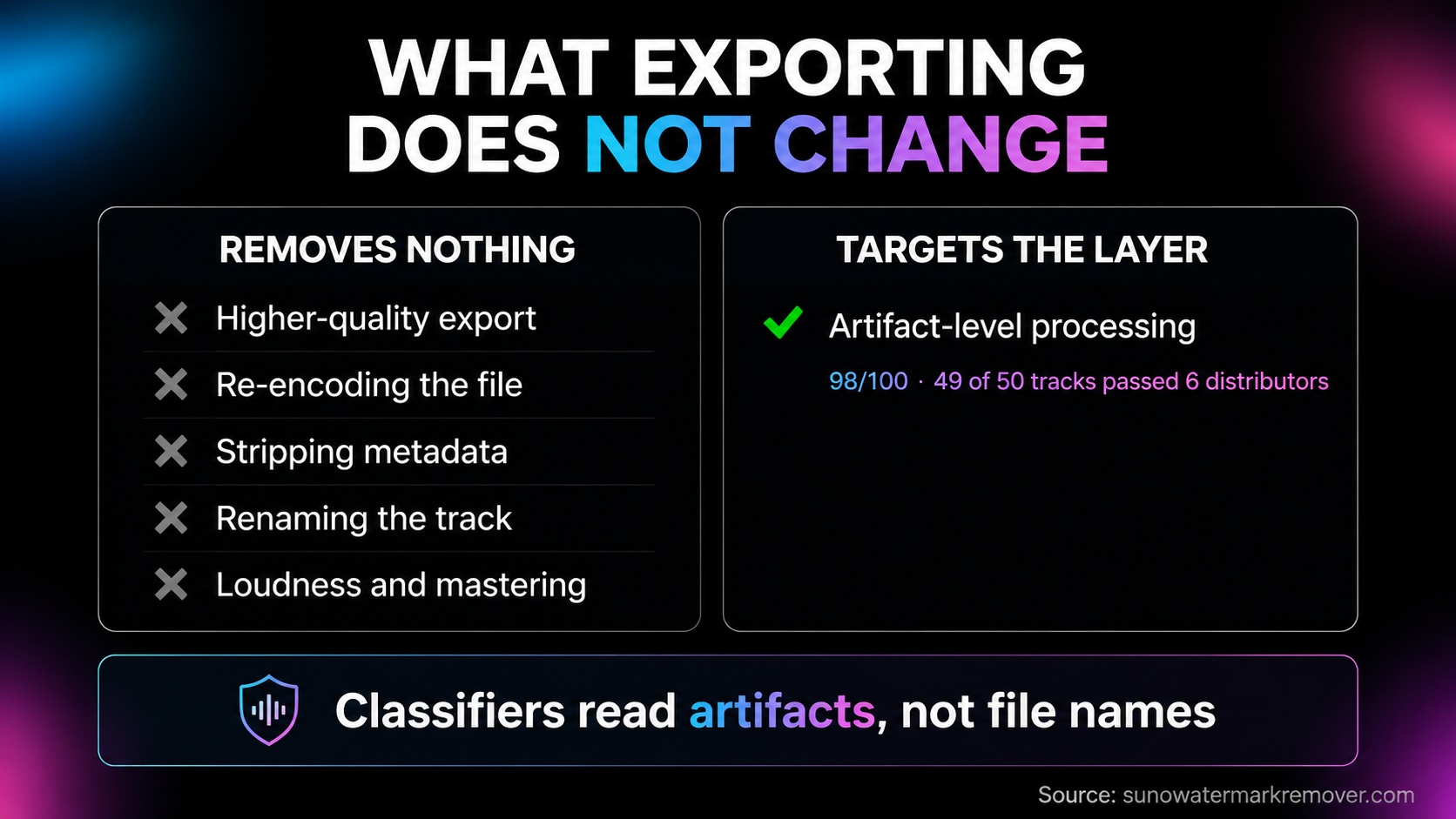
An exported Suno file is not a releasable file. Distributors run classifier screening at ingestion, and that screening reads the artifact layer: spectral fingerprints, phase relationships, sub-threshold noise patterns and micro-timing distributions that are inaudible to a listener and entirely legible to a model. Those artifacts survive every operation that does not specifically target them. Exporting at higher quality does not touch them. Re-encoding does not. Stripping metadata, renaming the file, running it through a loudness pass, mastering it in a DAW — none of it moves the classifier.
That is the mechanism behind the most common complaint in AI music forums: a track that sounds perfect, gets rejected at upload, and gives the producer no explanation to work from.
PopularAiTools ran the most thorough public test of this to date, putting 50 AI-generated tracks through every serious cleanup workflow and uploading the results to six distributors. Their 2026 artifact removal ranking put Undetectr first at 98/100, with 49 of 50 tracks clearing first-upload screening across TuneCore, DistroKid, Spotify, Apple Music, Amazon Music and YouTube Music. iZotope RX 11 came second at 72, passing 22 of 50 on DistroKid after four to six hours of manual spectral work per track at $399. The three DAWs scored between 48 and 58: Ableton Live Suite passed 14 of 50, Logic Pro 11, FL Studio 8, each after six to twelve hours a track.
The conclusion their testing reached matches what this site has found repeatedly. DAWs mask audible symptoms; they do not remove statistical fingerprints. A $749 studio stack plus eight hours of a Saturday underperforms a purpose-built tool by roughly five times on pass rate, because it is solving a different problem well. Our own artifact removal ranking covers the same ground with the full scoring.
One caveat, stated plainly, because most coverage of the August announcement will skip it. Suno's new watermark has not shipped. Nothing has been tested against it, no distributor has said how it intends to treat the signal, and Musixmatch Sentinel is a copyright detection system rather than a distributor screening product. Any claim that a given tool defeats the new watermark is unverifiable today, including claims made on this site's behalf. What is measurable is the artifact layer distributor classifiers read right now, and that is the layer the processing described here addresses.
Undetectr's engine targets the spectral fingerprints, phase entropy and micro-timing that classifiers read, leaving the composition untouched so the track is still the same performance. Around 90 seconds per track in the browser, MP3, WAV or FLAC out, mastering included.
Process a track before release → €39 lifetime, was €99 · ranked 98/100 on a 50-track distributor testWhat a full pre-deadline pass looks like
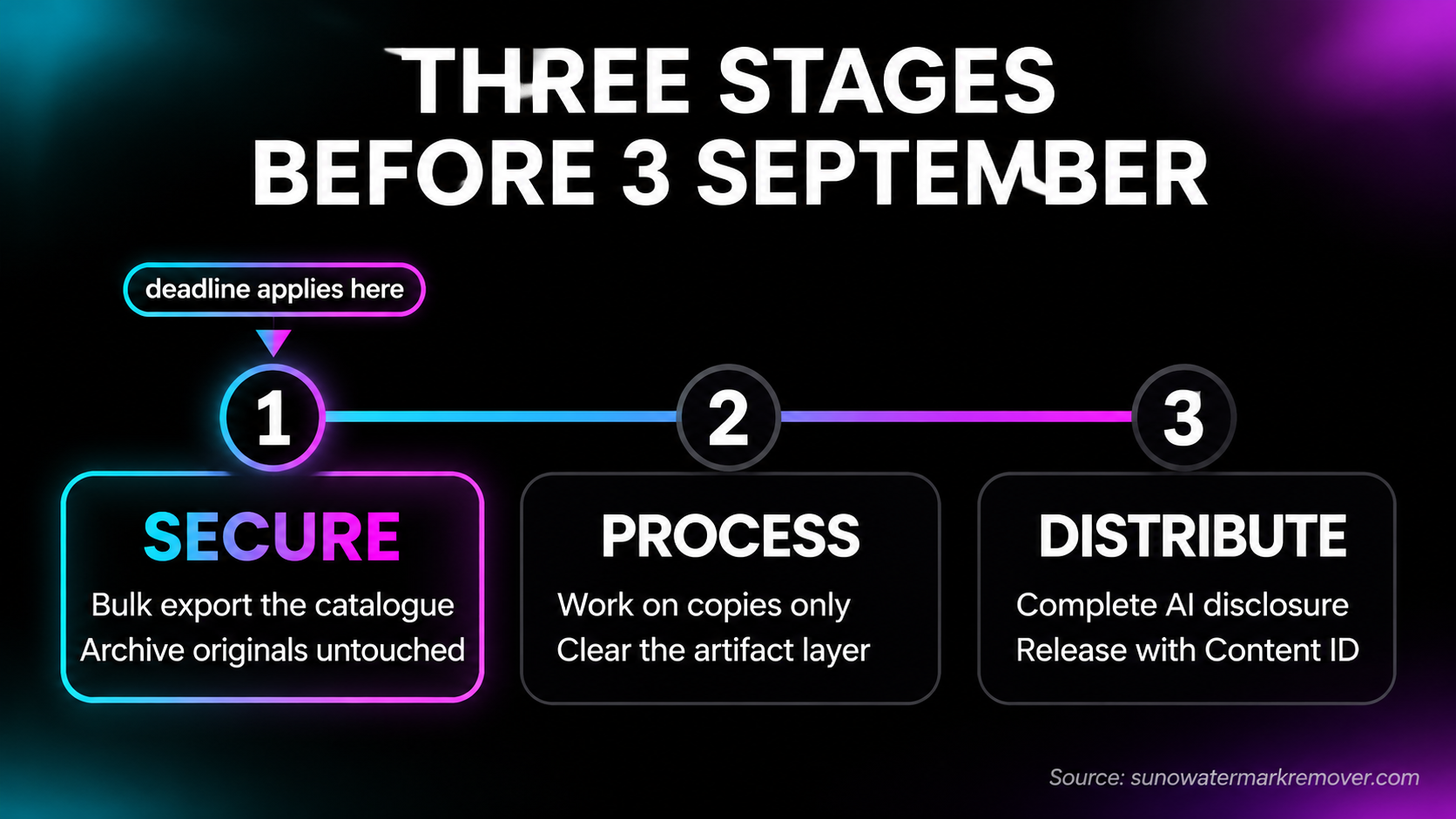
Three stages, in dependency order, because each one needs the output of the last.
Secure. Export the catalogue while the current allowance applies. Highest quality the tier offers, originals archived untouched, generation date and plan tier recorded alongside each file. That record is what answers a platform query quickly if one ever arrives, and it takes seconds at export versus hours to reconstruct later.
Process. Work on copies, never the archive. The artifact layer is what stands between a finished file and an accepted upload, and it is the one stage that cannot be done after submission.
Distribute. Release through a distributor with predictable screening and Content ID coverage, and complete the AI-disclosure fields honestly. Every major distributor added disclosure rather than banning AI outright, and undisclosed AI detected later is treated as a transparency violation — which pulls live releases, rather than merely rejecting an upload. This site's distributor policy comparison sets out where each one currently stands.
Worth being explicit about one thing, because the deadline framing invites the wrong reading. Downloading tracks you generated, within the allowance active on your account today, is ordinary use of the service. Nothing about exporting early circumvents a restriction, because the restriction is not yet in force. What changes on 3 September is the size of the allowance, not the legitimacy of using it.
Commercial rights are a separate question again, and they are unaffected by any of this. Those follow the plan that was active when a track was generated, as covered in this site's Suno commercial use guide. A download cap governs how many files leave the platform. It says nothing about what you may do with the files you already hold.
What the €39 actually covers
Since the bulk downloader is bundled rather than sold separately, the honest framing is what the plan includes rather than what the downloader costs.
The lifetime plan at €39, against a €99 list price, covers unlimited Suno playlist downloads, unlimited artifact processing, MP3, WAV and FLAC output, professional mastering, priority processing, and future features as they ship. Undetectr's own pricing page values the bundle at €264 across its components and prices the bulk downloader element at €29 within that.
The one thing worth flagging clearly: the bulk downloader is not part of the €19 Starter tier. If the export deadline is the reason you are reading this, Starter is not the plan that solves it.
Against the alternatives, the comparison is not close on either half of the job. On export, the paid alternative is Suno's own additional-download purchases after 3 September, indefinitely. On processing, the ranked alternatives run from $199 for Logic Pro to $749 for Ableton Live Suite plus $399 for iZotope RX, at four to twelve hours of skilled work per track, for pass rates between 48 and 72 percent.
Bulk playlist download plus unlimited artifact processing, mastering, and every format a distributor asks for. One payment, no subscription. Founder pricing is time-limited and the download caps land on 3 September.
Get the lifetime plan → €39, was €99 · 60% off founder pricingThe short version
If you want one track, use Suno's own download control. It is the original file and nothing beats it.
If you have a catalogue still sitting inside Suno on 24 August, the useful window is the next ten days. Gather it into public playlists, pull it down in bulk, archive the originals untouched, and process working copies before anything goes to a distributor.
And treat the two problems as genuinely separate, because they are. Exporting solves ownership of your files. It does nothing about whether a distributor accepts them, which is decided by a layer of the audio no downloader touches. Most producers discover the second problem a month after solving the first, usually in the form of a rejection email with no explanation attached.
Frequently asked questions
Several, and they fall into five categories: Suno's own per-track download, browser extensions, free web downloaders that take a song URL, open-source scripts on GitHub, and bundled bulk tools that take a whole playlist. For one track, Suno's native download is the best option because it gives you the original file with no re-encoding. For a back catalogue ahead of the 3 September cap, only the bulk category finishes the job in a single pass.
Inside Suno, open the track's menu and choose Download, then pick the audio format your tier offers. That exports one track at a time and counts against your allowance once the caps take effect on 3 September 2026. For an entire library, a bulk playlist tool such as Undetectr's takes the public playlist URL, fetches the track list, and returns the selection as a single ZIP of MP3s pulled from Suno's CDN.
Not through Suno's own interface, which is per-track. Undetectr's bulk downloader accepts a public Suno playlist URL, lists every track on it, and packages your selection into one ZIP. The practical step is to add the tracks you want into a public playlist inside Suno first, then paste that playlist URL into the tool. It needs no Suno login because it only reads public playlists.
Suno runs in the browser and ships mobile apps rather than a desktop application, so 'Suno downloader' searches that expect a PC program are usually looking for a way to save songs rather than install software. Anything presenting itself as a Suno desktop installer is worth treating with suspicion. Song export happens in the browser, either through Suno's own download control or a web-based bulk tool.
Yes, on paid tiers, and stems are exported separately from the mixed track. Stem export is worth doing before 3 September for anything you may want to remix or re-master later, because it is the one export you cannot reconstruct afterwards from a mixed file. This site's guide to Suno stems covers what the separation actually gives you.
No, and nothing here should be read that way. Bulk export is a convenience for exercising the allowance active on an account today, before the policy changes. Once the caps apply on 3 September the legitimate routes are the downloads included in a plan, an upgraded tier, or the additional downloads Suno sells. A tool marketed as a way past the cap after that date is describing something this site does not recommend.
No. Export copies the file; it does not alter what is inside it. Suno announced on 6 August 2026 that it will embed audio watermarking and Musixmatch Sentinel fingerprinting in generated tracks, and separately every AI generator leaves statistical artifacts that distributor classifiers read. Downloading is the first step. Processing the artifact layer before release is a different step, and the one that decides whether a distributor accepts the upload.
The ones that only take a public song URL are generally low-risk, though many re-encode the audio and hand back a smaller MP3 than the source. The category worth avoiding is anything asking for Suno account credentials, since that is a password handed to a third party for a job that does not require one. Undetectr's bulk tool works from public playlist URLs and never asks you to log in to Suno.
Ready to release your Suno tracks?
Explore Undetectr’s published track-processing features before preparing your release.